Exploring All Solutions to LinkedIn Queens Puzzle with a SAT Solver and Two Model Checkers
Jun 6, 2026
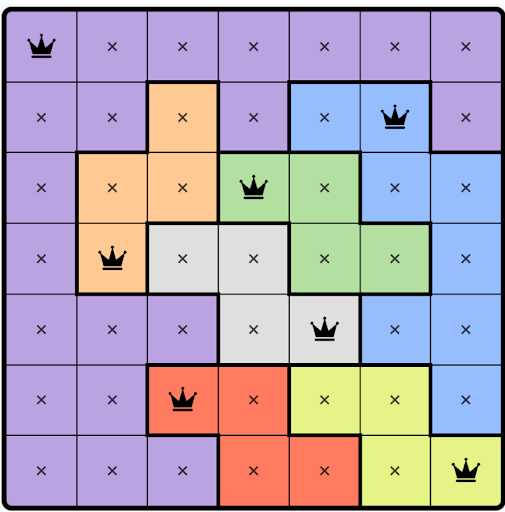
LinkedIn Queens is a puzzle played on an n × n grid with the following rules:
- The grid is divided into
ncolored regions. - Each row, column, and colored region must contain exactly one queen.
- No two queens may be adjacent, including diagonally. However, diagonals at a distance are allowed.
In this post, we find all solutions, not just one, using a Python‑based SAT solver and two model checkers (Spin and FizzBee). To keep things simple, we’ll solve the puzzle for a 4x4 grid using the SAT solver, but we will solve it both for 4x4 and 9x9 using model checkers.
The goal here is to explore how various computational approaches can tackle the same problem. For one, I believe there is a touch of elegance in how SAT solvers can sometimes reformulate complex problems. I also believe that model checkers, for instance, aren’t just powerful tools for ensuring correctness, but also a great way to learn about nondeterminism.
All the code in this post is linked in relevant sections, and the repository containing all the code is also linked in the references at the end.
Solving the Puzzle using a SAT Solver
I first came across this puzzle in a nice blog post by Hillel Wayne, whose blog I enjoy reading, where he solved it using an SMT solver called Z3.
In the past, I had used a Python-based SAT solver called PyEDA [1], and I thought it would be interesting to use it to find all solutions to the LinkedIn Queens puzzle. Let’s solve it for a 4x4 grid though the code extends to 9x9 grid. The code uses Python 3.13.1 and PyEDA 0.29.0.
At a high level, PyEDA lets us describe a problem using Boolean variables and rules over those variables, and then searches for settings that satisfy all the rules.
For example, suppose we create an array of two Boolean variables with X = exprvars('x', 2). Here, for example, X[0] could mean “put a queen in the first cell” and X[1] could mean “put a queen in the second cell.” PyEDA’s OneHot() function says that exactly one variable in a group must be true, so OneHot(X[0], X[1]) means exactly one of those two cells must contain a queen. When we ask PyEDA to search for settings that satisfy this rule, it returns only these two valid settings: {X[0]: 1, X[1]: 0} and {X[0]: 0, X[1]: 1}. It does not return {X[0]: 1, X[1]: 1} or {X[0]: 0, X[1]: 0} because those do not satisfy the rule.
With that idea in mind, to solve the 4x4 LinkedIn Queens puzzle in PyEDA, we start by representing the board as a two-dimensional array of Boolean variables:
X = exprvars('x', 4, 4)
We interpret X[r, c] to mean that cell (r, c) contains a queen. The solver then searches for True/False assignments to these variables that satisfy all the puzzle rules.
To represent colored regions, we assign each region a number. For example, cells marked with 1 belong to the red region, 2 to green, 3 to yellow, and 4 to pink. Consider the following layout of four regions in a 4×4 grid, where each row is assigned a distinct color:
1 1 1 1
2 2 2 2
3 3 3 3
4 4 4 4
We can map this layout using a Python dictionary as follows:
regions = {
        1: [(0, 0), (0, 1), (0, 2), (0, 3)],  # Region 1: cells 1-4 (row 0)
        2: [(1, 0), (1, 1), (1, 2), (1, 3)],  # Region 2: row 1
        3: [(2, 0), (2, 1), (2, 2), (2, 3)],  # Region 3: row 2
        4: [(3, 0), (3, 1), (3, 2), (3, 3)]   # Region 4: row 3
    }
In this small example, each region happens to be a whole row, so the region rule does not add anything new here. We are keeping it anyway because it shows how we encode regions. A little later, when we move to the model checkers, we will solve a puzzle with irregular regions where this rule really matters.
Next, we encode the rules of the puzzle as Boolean constraints. If the solver finds true and false values for the variables that make all of these constraints true at once, then we have a valid board.
The first constraint says that each row contains exactly one queen. In plain terms, that means one cell in the row must be chosen, and the others must not be. PyEDA’s OneHot() gives us exactly that. Here’s how we express this constraint for each row:
for r in range(n):
    row_vars = [X[r,c] for c in range(n)]
    constraints.append(OneHot(*row_vars))
We do the same for columns:
for c in range(n):
    col_vars = [X[r,c] for r in range(n)]
    constraints.append(OneHot(*col_vars))
And we do the same for each colored region.
Finally, we add the diagonal rule. This puzzle is a little different from the classic N-Queens puzzle: queens may lie on the same diagonal as long as they are not touching diagonally. Since each row and each column already gets exactly one queen, we do not need extra constraints for left-right or up-down neighbors here. The remaining local conflict is two queens on immediately adjacent diagonal cells. For example, a queen at (1, 1) forbids (0, 0), (0, 2), (2, 0), and (2, 2) as shown in the illustration below.
 X  .  X  .
 .  Q  .  .
 X  .  X  .
 .  .  .  .
To encode this, it is enough to look only one row down from each cell: (r+1, c-1) and (r+1, c+1). That covers every touching diagonal pair once. Looking upward as well would only repeat the same restriction.
for r in range(n-1):  # Stop before last row
        for c in range(n):
            # Below-left diagonal
            if c > 0:
                # A constraint like ~(X[1,1] & X[2,0]) means you can't have
                # queens at both (1,1) and (2,0) because ~(a & b) implies both
                # 'a' and 'b' can't be both true at the same time. That means,
                # the two cells cannot both contain queens.
                constraints.append(~(X[r,c] & X[r+1, c-1]))
            # Below-right diagonal
            if c < n-1:
                # A constraint like ~(X[1,1] & X[2,2]) means you can't have
                # queens at both (1,1) and (2,2)
                constraints.append(~(X[r,c] & X[r+1, c+1]))
That’s pretty much all we need to do to get not just one, but all possible solutions to the puzzle. We combine all the constraints and call PyEDA’s satisfy_all(). It returns all choices of true and false values that make the full formula true, which here means all valid boards.
Below are two valid solutions for the above board with specific regions. Here is the complete code that generated these two solutions.
Solution 1 - Queens at cells: [3, 5, 12, 14] (Cells are numbered from 1 to 16 (top‑left is 1, bottom‑right is 16)):
 .  .  Q  .
 Q  .  .  .
 .  .  .  Q
 .  Q  .  .
Solution 2 - Queens at cells: [2, 8, 9, 15]:
 .  Q  .  .
 .  .  .  Q
 Q  .  .  .
 .  .  Q  .
You can also explore the same idea interactively below, just to get a sense of how Spin steps through the search, backtracks, and finds a solution. Try stepping through the search and watch how invalid branches are blocked and how Spin resumes from an earlier unexplored choice.
If the interactive does not load, you can open it directly here.
Now let’s try to solve the puzzle using a model checker, again with the goal of finding all possible solutions, not just one. We’ll start with Spin, which uses Promela as its modeling language.
Solving the Puzzle Using Spin
You can use a model checker to check the correctness of a system. You start by first creating a model of that system. A model abstracts the behavior you want to study while leaving out details that are not relevant to the question you are asking. Once you have written the model, you specify correctness properties that should hold in all reachable executions of the model. The model checker then explores those executions and searches for violations of those properties. If it finds a violation, it reports a counterexample that you can study to understand the error and improve the model or the system design.
Spin is a model checker that works with models written in Promela. It can systematically explore many program behaviors that arise because of nondeterministic choices or concurrency.
For this puzzle, we will write a Promela model that describes how queens may be placed and which placements are not allowed, so Spin can search for valid solutions. We are not using Spin mainly to check whether the model satisfies a correctness property. Instead, we encode the puzzle as a sequence of choices constrained by the puzzle rules and let Spin explore the resulting executions. Any execution that gets all the way through those constraints corresponds to a valid solution to the puzzle.
Let’s quickly review Spin’s verification process. Spin analyzes the correctness of a system through verification, which involves three main steps:
- First, write the model in Promela and save it in a
.pmlfile. - Generate a verifier. Run
spin -a model.pmlto generate a C file namedpan.c(the namepanis historically derived from “protocol analyzer”). Then compile that file with a C compiler, for examplegcc -o pan pan.c. The resulting executable, usually namedpan, is Spin’s verifier. - Run the verifier. One can run it using the shell command
./pan. It reports whether all computations are correct or there exists a computation that contains an error. If an error is found, the verifier produces a trail file which can be used to reconstruct the erroneous computation. We’ll make use of trail files shortly, to extract valid puzzle solutions.
Let’s now turn to an example that introduces two Spin concepts, blocking expressions and nondeterminism, which we’ll use to solve the puzzle. Nondeterminism lets Spin try different queen placements, and blocking expressions let Spin discard invalid placements that break the puzzle rules.
The first concept is a blocking expression that blocks execution when it evaluates to false. In Spin terms, this means the process that was running cannot move on to its next statement. For example, the following statement blocks execution when x equals 2:
! (x == 2);
The statement above lets the process move forward only if the condition is true. The ! symbol means ‘negation,’ so the statement is true when x is not equal to 2. So, the process continues only when x is not 2.
The second concept is how nondeterminism and error search work in Spin. Consider the following small program (All Spin code in this post was written using Spin version 6.5.2):
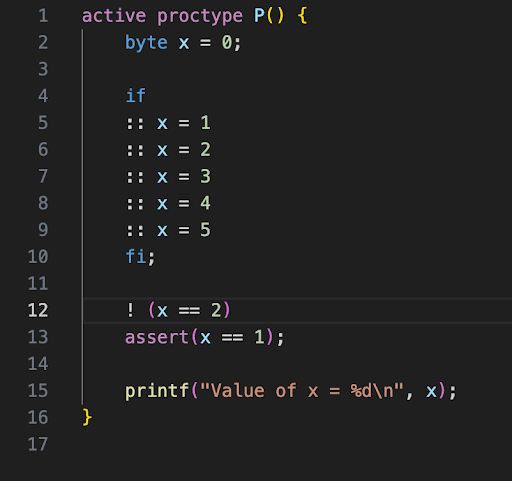
We wrap our code in a process-like executable unit using the proctype keyword in Promela. When we prefix a proctype definition with the active keyword, we are telling the model checker to automatically start that process when Spin begins execution.
The if statement as written above (starting with the keyword if and ending with fi) is how nondeterministic choice is expressed in Promela and Spin. Inside an if statement, each option starts with ::. The first statement after :: is called a guard. If more than one guard statement is executable, Spin chooses one of them nondeterministically. In this case, the if block assigns a value to x nondeterministically. After this if statement is executed, x will have one of the values: 1, 2, 3, 4, or 5.
To further understand how this nondeterminism will play out, below is an automaton in Figure 1 that represents the possible transitions for this code (generated using a tool called jSpin [2]):
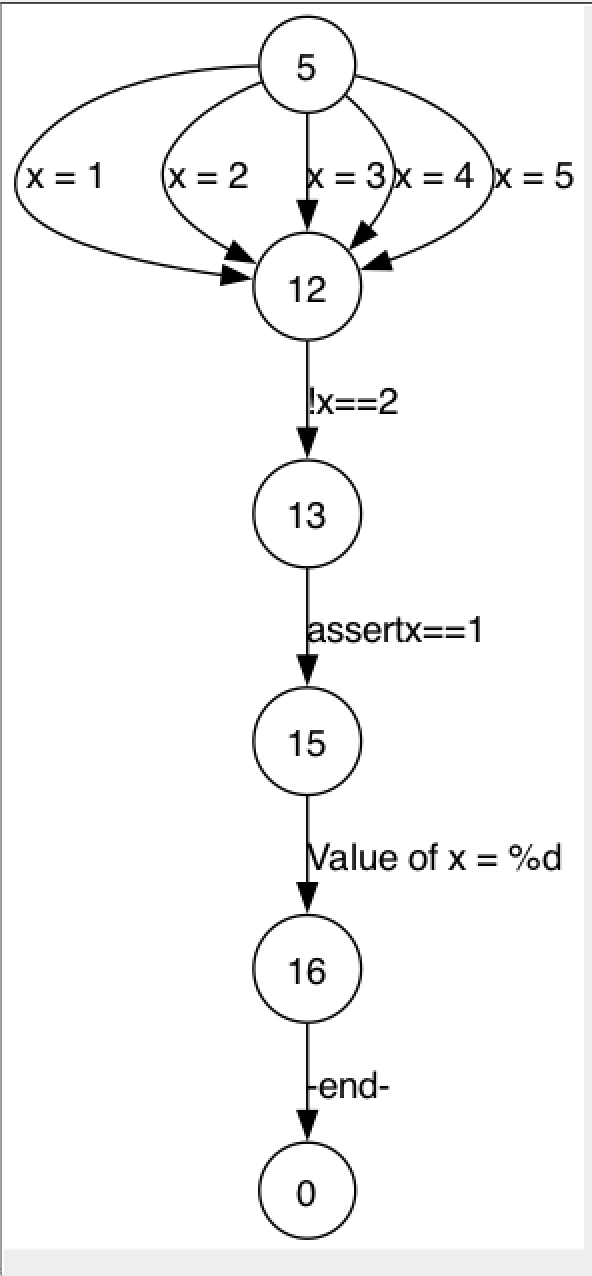
Figure 1
The numbers inside the circles represent line numbers. As you can see, there is not just one computation path from start to finish, there are five possible computations, depending on which value is assigned to x.
At the end of the above program, we have an assert that checks whether x == 1. Will this assertion pass? No, it will fail. Spin explores the executions created by the nondeterministic choice above, and whenever an execution reaches the assertion, it checks whether the condition is true. The assertion passes when x is 1. It fails when x is 3, 4, or 5, so Spin reports those executions as error trails. It does not fail when x is 2, because that execution blocks earlier at !(x == 2) and never reaches the assertion.
Here’s a truncated version of the assertion violation report you would see when you run your model (assuming the above code is saved in a file named atest.pml):
$ spin -a atest.pml
$ gcc -o pan pan.c
$ ./pan -E
pan:1: assertion violated (x==1) (at depth 1)
pan: wrote atest.pml.trail
The -E switch tells the verifier not to report invalid end-state errors. Here, this switch keeps the output focused on assertion violations. As we see in the output above, a trail file named atest.pml.trail is generated. We can replay that trail file with Spin’s -t -p switches, inspect the output, and see how the computation led to the error. The output below, truncated for clarity, shows the sequence of steps that led to the assertion failure.
$ spin -t -p atest.pml

  1:    proc  0 (P:1) atest.pml:7 (state 3)     [x = 3]
  2:    proc  0 (P:1) atest.pml:12 (state 8)    [(!((x==2)))]
spin: atest.pml:13, Error: assertion violated
The output above shows that the assertion failed in the computation where x was set to 3. But there are other counterexamples that would also cause the assertion to fail, for example, when x is set to 4 or 5. So how do we find all these counterexamples? We can do that using the following command:
./pan -E -c0 -e
pan:1: assertion violated (x==1) (at depth 1)
pan: wrote atest.pml1.trail
pan: wrote atest.pml2.trail
pan: wrote atest.pml3.trail
For each counterexample, Spin generates a separate trail file (e.g., atest.pml1.trail, etc). We can replay these trail files to reconstruct the exact sequence of steps that led to the assertion failure. For example, let’s inspect the contents of atest.pml3.trail to see another such erroneous computation:
$ spin -p -t -k atest.pml3.trail atest.pml

  1:    proc  0 (P:1) atest.pml:9 (state 5)     [x = 5]
  2:    proc  0 (P:1) atest.pml:12 (state 8)    [(!((x==2)))]
spin: atest.pml:13, Error: assertion violated
We see that when x was set to 5, it refuted our assertion claim. We can similarly replay the trail for other files with commands spin -p -t -k atest.pml1.trail atest.pml and spin -p -t -k atest.pml2.trail atest.pml.
The key takeaway is this: we nondeterministically set x, wrote an assertion, and let the model checker backtrack and explore all possible computations involving the different values x could take and the model checker found all computations that violated the assertion and reported them as counterexamples.
This ability of Spin to take code with nondeterminism and systematically backtrack and explore all possible computations in order to find a counterexample to an assertion is central to how we’ll find all solutions to the puzzle [3].
So how do we find those valid combinations that are solutions to LinkedIn Queens puzzle?
Figure 1 helped me come up with a solution. In that figure, we chose a value for x nondeterministically from five options. The model checker then explored all five possible computations, one for each choice. Similarly, if we let the model checker nondeterministically pick one cell from each region, while enforcing the puzzle rules, and then backtrack through all possibilities, we can find all valid solutions.
To visualize this, I found it helpful to imagine a tree-like structure, as shown in Figure 2 below (If the image appears unclear, please consider opening it in a new tab.). It is of course not ideal, but it helped me think through the problem. For both Figure 2 and Figure 3 below, we use the same board and colored region configuration as in the Python code above—where 1s represent region colored red, 2s represent region colored green, 3s represent region in yellow, and 4s represent region in pink. The board layout looks like this:
1 1 1 1
2 2 2 2
3 3 3 3
4 4 4 4
In this configuration:
- Region 1 includes cells 1, 2, 3, 4
- Region 2 includes cells 5, 6, 7, 8
- Region 3 includes cells 9, 10, 11, 12
- Region 4 includes cells 13, 14, 15, 16
We could now imagine a tree with four levels. At level 0, you see all the cells from Region 1. From each of those cells, there are branches leading to every cell in Region 2. In the figure, in Region 1, we show a branch going out from cell 1 just to save space. You can imagine similar branches coming from cells 2, 3, and 4 as well, and the same for all cells in level 1 and 2.
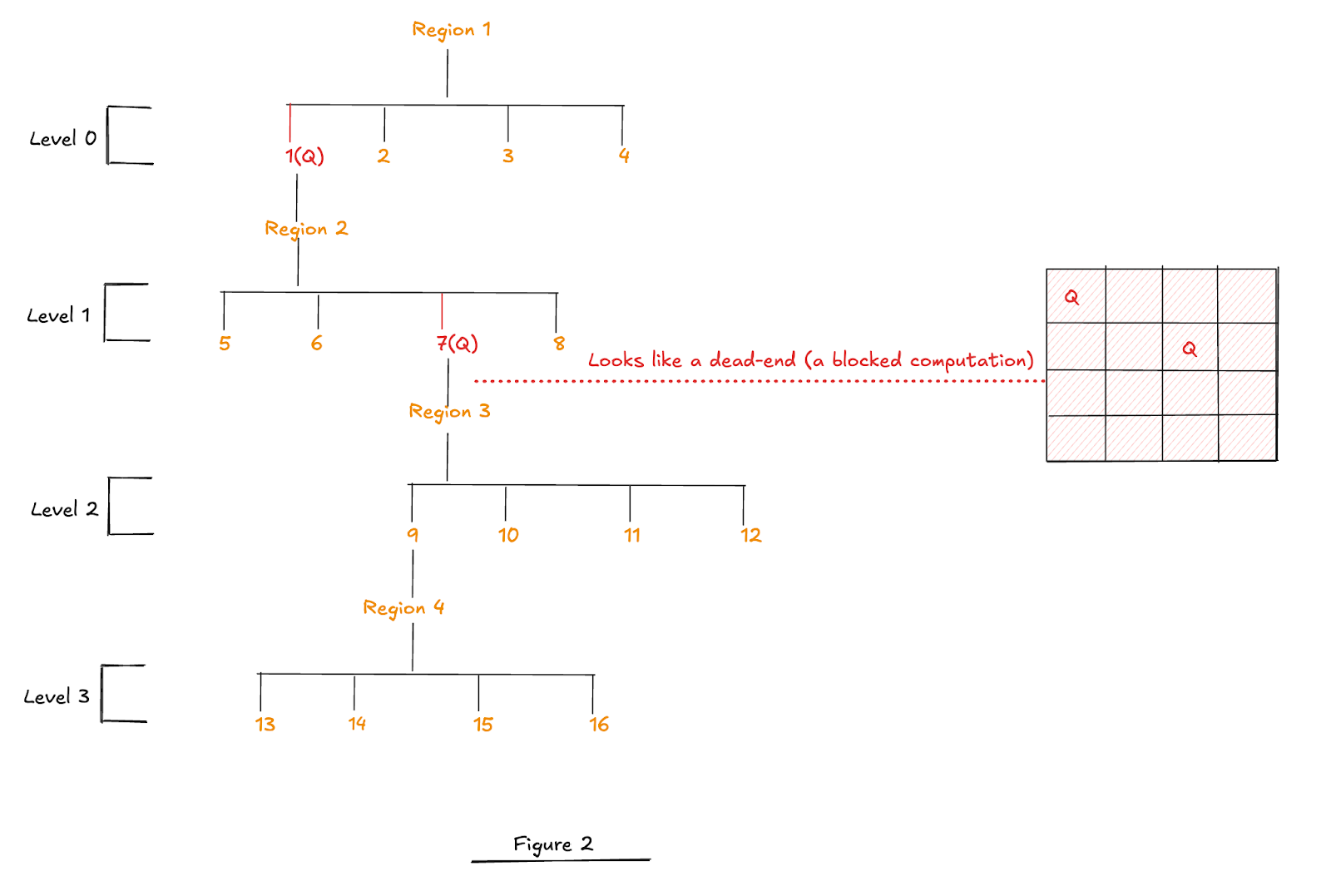
Figure 2
Now let’s see what is going on in Figure 2. A queen is first placed in cell 1, and then the search moves on to Region 2, where cell 5 is ignored because of a column constraint and cell 6 is ignored because of a diagonal constraint. It places the queen in cell 7. The board at this point is shown on the right. When it moves to Region 3, it hits a dead-end, there is no cell available where the queen can be placed without violating the constraints.
At that point, we could imagine Spin backtracking. Let’s look at the following illustration to see what happens next.
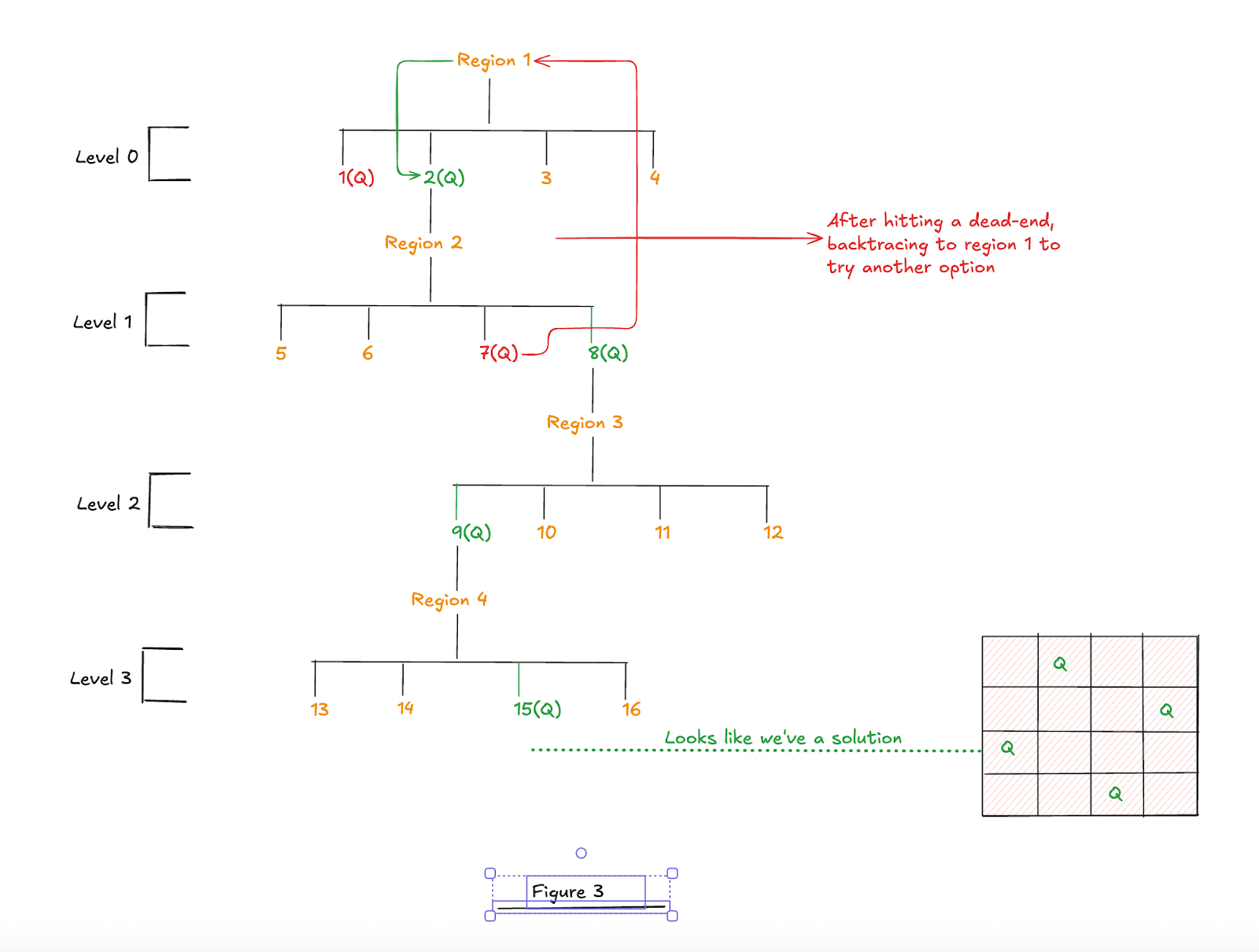
Figure 3
After hitting a dead-end, Spin backtracks to the most recent nondeterministic choice whose other alternatives have not yet been explored. In the figure, I illustrate that next unexplored choice as a jump back to an earlier region, shown by the red arrow going from 7(Q) back to 2(Q). The red arrow is only a visual aid showing where the search resumes after backtracking; it is not meant to be read as one literal execution step. From there, it places the queen in cell 2 in region 1 (shown as 2(Q), colored in green). After successfully placing a queen there, it moves on to region 2, where it rejects cell 6 due to a column conflict, and cells 5 and 7 due to diagonal clashes. It then selects cell 8. In region 3, given all constraints, it places the queen in cell 9, and finally, in region 4, respecting constraints, it finds a valid position at cell 15, thus completing one valid solution in compliance with the puzzle constraints (the solved board is shown at the right).
Now let’s begin working toward a solution in Spin, with the goal of finding all possible solutions to the puzzle. We’ll solve it first for a 4x4 grid as it is simple, and then the same code, with minor changes, would be used to solve it for a 9x9 grid.
We use the same board and colored regions configuration as given above. We encode the region of 1s as:
inline ChooseRegion1() {
    if
    :: cell = 1
    :: cell = 2
    :: cell = 3
    :: cell = 4
    fi
}
And region 2 as:
inline ChooseRegion2() {
    if
    :: cell = 5
    :: cell = 6
    :: cell = 7
    :: cell = 8
    fi
}
And so on. Why make the model checker choose cells nondeterministically? We can connect this to Figures 2 and 3 and the explanation that followed. By organizing regions and their cells as shown in these figures you can see how this structure shows how the model checker might systematically explore all combinations.
We also define a few variables at the top of the model:
#define N 4
#define ADJ1(a,b) ((a) == (b) + 1 || (b) == (a) + 1)
byte result[N];
bool rows[N];
bool cols[N];
bool regions[N];
byte qcol[N];
The result array stores the final solution. Each result[region-1] holds the cell where a queen is placed in that region. For example, result[0] = 2 means the queen is placed in cell 2 in region 1.
The array rows keeps track of whether a queen has already been placed in a given row. For example, rows[i] is true if there is a queen in row i. Similarly, cols keeps track of whether a queen has been placed in a given column.
The array qcol stores one piece of information for each row: if that row already has a queen, qcol[row] tells us which column that queen is in. For example, if qcol[2] = 0, then the queen in row 2 is in column 0.
This helps because we do not need to store the whole board to check diagonal adjacency. To see whether a new candidate cell would touch an existing queen diagonally, we only need to know two things: whether a neighboring row already has a queen, and if it does, which column that queen is in. The array rows answers the first question. The array qcol answers the second.
The macro ADJ1(a,b) is true when the two column numbers differ by 1. In plain terms, it tells us whether one column is immediately to the left or right of the other. Two queens touch diagonally only if one is in a neighboring row and their columns differ by 1.
That is why rows, qcol, and ADJ1 are enough to detect forbidden diagonal adjacency without storing the whole board. This works because a diagonal-touch conflict can only occur with a queen in the row just above or just below the candidate cell, and only when that queen’s column differs by 1. The array rows tells us whether a neighboring row already contains a queen, qcol tells us which column that queen is in, and ADJ1 checks whether the two columns differ by 1.
The general outline of what happens in the program is as follows. As the program processes the board region by region iteratively, from region 1 to 4, it performs these steps in sequence (we’ll go over each in some detail shortly):
- Iterate through all regions and do the following in each iteration:
- Choose cells for a region nondeterministically.
- Checks whether a queen is already placed in the current row and column. If we have, we block the process.
- Ensures that we are not placing a queen on an adjacent diagonal. If we are, the process is blocked.
- Mark the row, column, and region as occupied.
- Places the queen and records its position in the
resultarray.
- After exiting the loop, we deliberately use
assert(false)so that every computation that successfully exits the loop triggers an assertion violation and produces an error trail. When we replay that trail, we can read the values assigned to theresultarray; those values are the cells where the queens were placed, so they give us the solution.
Let’s quickly go over these one by one.
We start a loop to process the board region by region, and the first step inside the loop is to choose region cells nondeterministically using the following code:
    if
        :: region == 1 -> ChooseRegion1()
        :: region == 2 -> ChooseRegion2()
        :: region == 3 -> ChooseRegion3()
        :: region == 4 -> ChooseRegion4()
    fi
The program then checks and blocks if a queen has already been placed in the chosen row. This is done using a blocking expression:
!rows[row];
As we discussed earlier, the execution continues if above is true, meaning the row is still available. It is important to note that, because of these blocking statements, many computations will be blocked, but some will not. To find valid solutions to the puzzle, we will make use of the assertion claim. More on this in a bit.
After checking the row, we similarly block the placement if a queen has already been placed in the same column. We also block the move if a queen has already been placed in this region.
For the diagonal rule, the code checks the same thing you would check on the board, but it does so through rows and qcol instead of by storing every cell.
Suppose, using zero-based indexing, that we are currently considering the candidate cell (5, 4). At this point, earlier region choices may already have placed queens elsewhere on the board. To see whether (5, 4) violates the diagonal rule, we only need to look at the four cells that touch it diagonally: (4, 3), (4, 5), (6, 3), and (6, 5). No other diagonal cells matter, because this puzzle forbids only diagonal touching; longer diagonals are allowed. We could illustrate the relevant rows, columns, and positions like this:
          col 3   col 4   col 5
row 4       X       .       X
row 5       .       C       .
row 6       X       .       X
Here C is the candidate cell (5, 4). The four X cells are the only cells that touch it diagonally: (4, 3), (4, 5), (6, 3), and (6, 5).
So the code asks: does row 4 already contain a queen, and if so, is it in column 3 or 5? It asks the same question for row 6. The array rows tells us whether those neighboring rows already have queens. If they do, qcol tells us the corresponding columns. Then ADJ1(qcol[neighboring_row], col) checks whether the stored queen column and the candidate column differ by 1. If they do, the candidate would touch an existing queen diagonally, so Spin blocks that execution. For example, if the candidate cell is (5, 4) and there is already a queen at (4, 5), then qcol[4] is 5, ADJ1(5, 4) is true, and Spin blocks that choice.
We check both neighboring rows because the search proceeds in region order, not row order. By the time we consider a candidate cell, either neighboring row may already have been filled.
Once a valid cell is found, we mark the row, column, and region as occupied and we store the queen’s position in the result array:
rows[row] = true;
cols[col] = true;
result[region-1] = cell;
At this point, we have finished processing the region, so we move on to the next by restarting the loop. This process repeats until all regions have been processed.
As you can see, near the end, after the loop, we have added this line:
assert(false);
This does not tell Spin to search for solutions directly. Rather, it deliberately turns every execution that gets past all the guards and reaches this point into an assertion violation. That assertion violation makes Spin write an error trail. When we replay the trail, Spin shows the assignments made along that execution, including the final values in the result array. Those values identify the cells that contain queens. So the reported “error” here is not a bad puzzle state; it is the mechanism we use to make Spin emit a trail for each successful placement. Here is the code for 4x4 grid.
Now to find a solution, we run the model and then run the verifier.
You will see an assertion violation, along with a message indicating that a trail file has been written:
$ spin -a queenfourbyfour.pml
$ gcc -o pan pan.c
$ ./pan -E
pan:1: assertion violated 0 (at depth 79)
pan: wrote queenfourbyfour.pml.trail
Replay the trail file with command:
$ spin -p -t -k queenfourbyfour.pml.trail queenfourbyfour.pml
The above will generate output that includes the contents of the result array, our solution to the puzzle. Somewhere near the end of the generated output, you will see the result array printed:
result[0] = 2
result[1] = 8
result[2] = 9
result[3] = 15
If we plot the above values from the result array onto a board, we get a valid solution to the LinkedIn Queens puzzle:
 .  Q  .  .
 .  .  .  Q
 Q  .  .  .
 .  .  Q  .
But this gives us just one solution to the puzzle. How can we find all solutions, ideally without adding any more code to our existing model? As we did earlier, by running ./pan -E -c0 -e. You will get two solutions to the puzzle in respective trail files (i.e., queenfourbyfour.pml1.trail and queenfourbyfour.pml2.trail). Here is the second solution:
result[0] = 3
result[1] = 5
result[2] = 12
result[3] = 14

 .  .  Q  .
 Q  .  .  .
 .  .  .  Q
 .  Q  .  .
Without changing much code, we can extend these ideas to a 9x9 grid. Here is a LinkedIn Queens puzzle by LinkedIn on a day in July 2025:
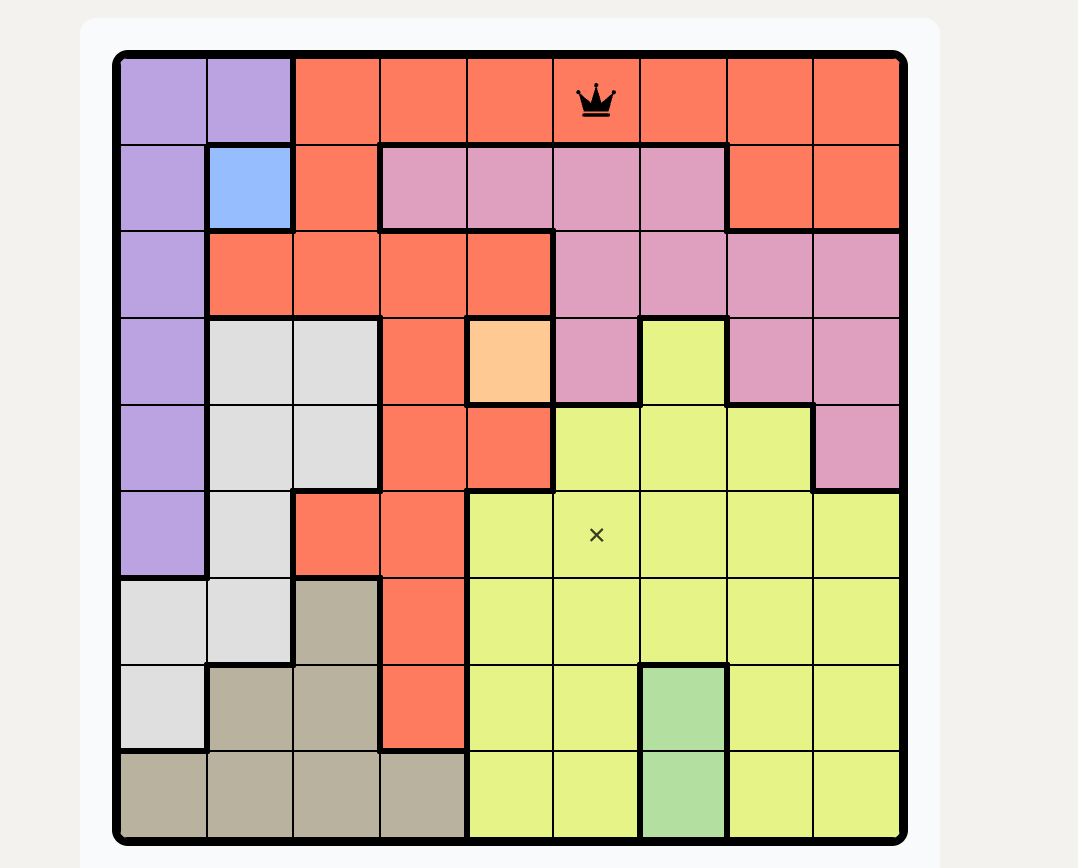
Here is the complete code that gives us the solution to this puzzle. When I run it, I find the solution:
result[0] = 46
result[1] = 11
result[2] = 6
result[3] = 26
result[4] = 39
result[5] = 32
result[6] = 63
result[7] = 76
result[8] = 70
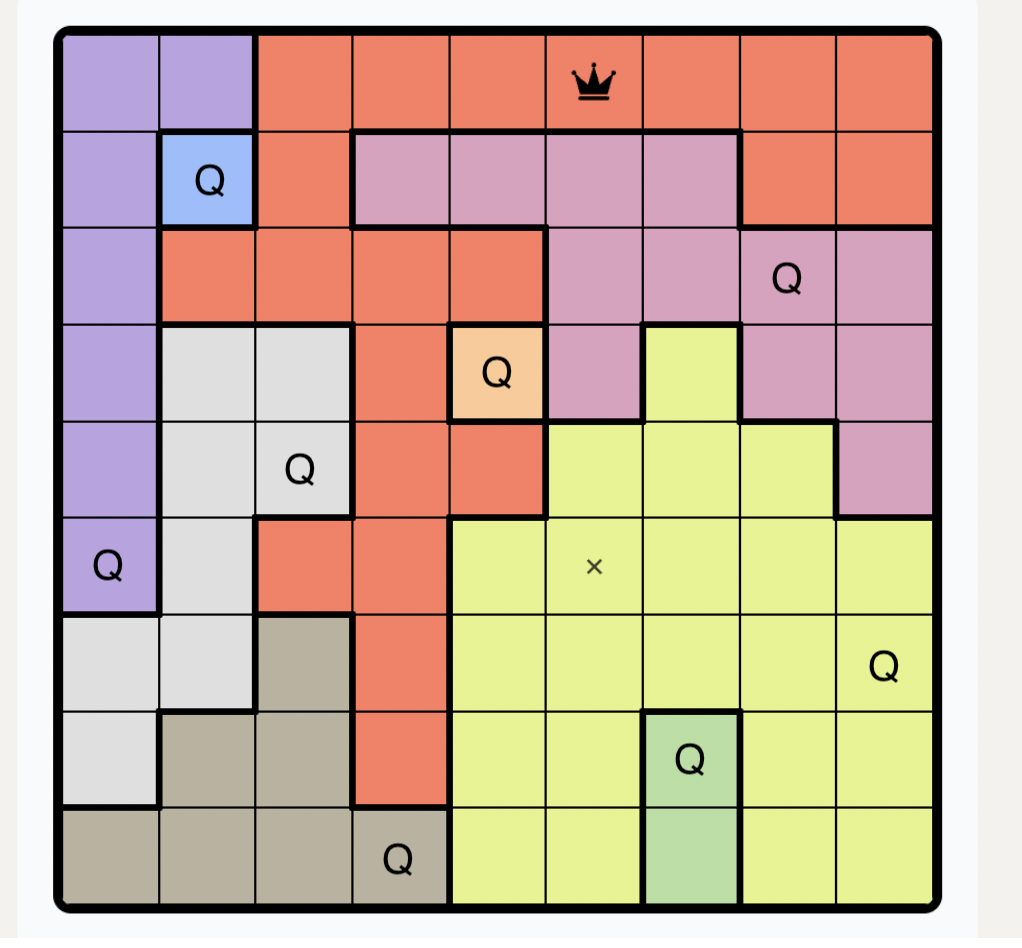
I took the original image and, based on the values in the result array, placed queens (marked as “Q” above) in the image. It looks like a valid solution to the puzzle that satisfies all the constraints. (Please ignore the small ‘x’ in the image above, it was just a placeholder in the original image.)
Just for fun and curiosity, I wanted to find all solutions to the puzzle without the region constraint, that is, to find all valid queen placements where exactly one queen is placed in each row and column, and no two queens are adjacent, including diagonally. This code does that, and it reports 5242 solutions to the puzzle when we drop the region constraint for a 8 x 8 grid (please note that if you run this, it will generate as many trail files as there are solutions).
Basically, to sum it up, the method we have used to solve the puzzle is this: represent the unknown parts of the problem as nondeterministic choices, and express the rules so that invalid choices are blocked as early as possible. Spin then systematically explores the remaining computations and backtracks whenever it reaches a dead end. Any computation that makes it all the way to the end corresponds to a valid solution. The same method can be used for other problems where the goal is to choose values or positions that satisfy a set of rules.
In the end, I’d say that Spin’s support for nondeterminism is quite powerful and it can be leveraged to solve certain kinds of problems in an elegant way.
Solving the puzzle with FizzBee
There’s another promising model checker on the horizon called FizzBee. Its syntax is close to Python, which makes it approachable for Python programmers.
To find a solution using FizzBee, I applied similar ideas to those I used with Promela and Spin.
Just as we wrap the code we want to explore in a proctype in Promela to model process-like behavior, in FizzBee we use an action block to define such executable units.
We begin with the Init action, a special action that runs once at the start. It sets up the state. Here is what Init looks like in our case:
action Init:
    N = 9  # 9x9 board
    # Define REGIONS as a list of cell IDs; omitted here for brevity
    #Also, we map each cell to (row, col) in the code
    board = [[0 for _ in range(N)] for _ in range(N)]

    row_queen_placed_in = [False for _ in range(N)]
    col_queen_placed_in = [False for _ in range(N)]
    region_queen_placed_in = [False for _ in range(N)]
    diagonals_blocked = [[False for _ in range(N)] for _ in range(N)]
    region_idx = 0
    done = False
After that, the main search for solutions happens inside the PlaceQueens action.
PlaceQueens first checks whether all regions are filled; if so, it sets done to true and returns. Otherwise, it processes the regions one by one: for each region it picks a candidate cell, checks the constraints, places a queen if allowed, updates the bookkeeping, and then advances to the next region.
Let’s take a quick look at the FizzBee constructs we use as we process each region in turn.
We start a loop to iterate over each region. Then to pick a cell, we use the any keyword. This makes the model checker explore every possible cell in the current region. This allows FizzBee to systematically explore valid combinations of cell placements across all regions.
atomic action PlaceQueens:
    if all([queen for queen in region_queen_placed_in]):
        done = True
        return

    while region_idx < N:
        cells_in_region = REGIONS[region_idx]
        cell = any cells_in_region

        row = (cell - 1) // N
        col = (cell - 1) % N
We then use require guards to check the puzzle rules for the chosen cell. Each guard ensures that the row, column, and region are free, and that no queen is placed on any of the four immediate diagonals. If a require fails, FizzBee abandons only that candidate branch; the other choices produced by any are still explored. If all guards pass, we place the queen, mark the row, column, and region as used, and block the four diagonally adjacent cells so they cannot be used.
while region_idx < N:

    cells_in_region = REGIONS[region_idx]
    cell = any cells_in_region

    row = (cell - 1) // N
    col = (cell - 1) % N


    require row_queen_placed_in[row] == False  # row must be free
    require col_queen_placed_in[col] == False  # col must be free
    require region_queen_placed_in[region_idx] == False  # region must be free
    require diagonals_blocked[row][col] == False  # cell must not be diagonally blocked

    # commit placements
    board[row][col] = 1
    row_queen_placed_in[row] = True
    col_queen_placed_in[col] = True
    region_queen_placed_in[region_idx] = True

    # block the four immediate diagonal neighbors
    if row > 0 and col > 0:
        diagonals_blocked[row-1][col-1] = True # upper-left
    if row > 0 and col < N-1:
        diagonals_blocked[row-1][col+1] = True # upper-right
    if row < N-1 and col > 0:
        diagonals_blocked[row+1][col-1] = True # lower-left
    if row < N-1 and col < N-1:
        diagonals_blocked[row+1][col+1] = True # lower-right

    region_idx += 1
FizzBee also lets us specify safety properties, properties that state a ‘bad thing never happens.’ We write these properties using the always keyword. For example, to express that a variable temperature should never be greater than zero, we can write:
always assertion AlwaysLessThanEqualsZero:
  return temperature <= 0
To check this invariant, the model checker looks for counterexamples where temperature is greater than zero. If no such counterexample exists, the invariant holds and the model is considered correct.
Here’s a small FizzBee example where we return false if the temperature is greater than zero. Since the temperature is set to 5 in the Init action, the invariant fails, false is returned, and FizzBee reports this as an invariant violation, with a counterexample trace showing us the state where the invariant did not hold.
# A simple example showing how returning False triggers a counterexample

action Init:
    temperature = 5

always assertion AlwaysLessThanEqualsZero:
    if temperature <= 0:
        return True
    return False
When we run the above model, FizzBee reports:
FAILED: Model checker failed. Invariant:  AlwaysLessThanEqualsZero
------
Init
--
state: {"temperature":"5"}
------
In our puzzle, the same logic applies. We define the invariant as an “invalid board.” When that invariant fails, meaning none of the invalid conditions hold, FizzBee reports a counterexample, which is a valid solution to the puzzle.
An invalid board means these things:
- Not all queens are placed,
- A row with more than one queen,
- A column with more than one queen,
- A pair of queens touching diagonally, or
- A region that doesn’t contain exactly one queen.
If any of these conditions hold, the board is invalid. A counterexample to this assertion is a valid solution. We check for these assertions in the invariant section that begins with the always assertion keyword. When none of these invalid-board conditions hold, the invariant returns False. FizzBee then reports a counterexample, a board that violates the “invalid board” assertion, which represents a valid solution to the puzzle.
When I run this code for the above 9x9 LinkedIn Queens puzzle, FizzBee returns a counterexample. You can find it by checking the value of the board variable in the output. And the counterexample corresponds to a valid LinkedIn Queens solution.
Below is the resulting 9×9 board, taken from the board variable in the counterexample. A value of 1 marks a cell where a queen is placed.
[0, 0, 0, 0, 0, 1, 0, 0, 0]
[0, 1, 0, 0, 0, 0, 0, 0, 0]
[0, 0, 0, 0, 0, 0, 0, 1, 0]
[0, 0, 0, 0, 1, 0, 0, 0, 0]
[0, 0, 1, 0, 0, 0, 0, 0, 0]
[1, 0, 0, 0, 0, 0, 0, 0, 0]
[0, 0, 0, 0, 0, 0, 0, 0, 1]
[0, 0, 0, 0, 0, 0, 1, 0, 0]
[0, 0, 0, 1, 0, 0, 0, 0, 0]
Unlike Spin with the options used earlier, FizzBee does not directly list every counterexample for this model. So this FizzBee version is best read as a way to find a valid solution. To enumerate solutions, JP (the creator of FizzBee) suggested a workaround: print the board when the assertion reaches a valid completed board, and return True instead of False so the model checker continues exploring.
Please keep in mind that I’m only human, and there’s a chance this post contains errors, even though I’ve done my best to avoid them. If you notice anything off, I’d appreciate a correction. Please feel free to send me an email. Thanks to JP for reading the draft.
References
- PyEDA: https://pyeda.readthedocs.io/en/latest/overview.html
- jSpin: https://github.com/motib/jspin
- Ben Ari’s book introduced me to nondeterminism in Spin. Ben-Ari, M. (2008). Principles of the Spin model checker. Springer.
- Repository containing all code in this post: https://github.com/wyounas/model-checking/blob/main/puzzles/linkedin_queens
- Spin manual, assert: https://spinroot.com/spin/Man/assert.html
- Spin manual, condition statements: https://spinroot.com/spin/Man/condition.html
- Spin manual, pan options including
-E: https://spinroot.com/spin/Man/Pan.html - Spin manual, if: https://spinroot.com/spin/Man/if.html
- I built the interactive with AI assistance and manually checked the behavior.